TraceIt! Digital Product Passport
Every garment has a story: where the fabric came from, what it's made of, who made it, how it should be cared for. Most of that story dies at the shop floor door. TraceIt! is the public page that carries it all the way to the person wearing the garment.
It's a Digital Product Passport — a page anyone can open, with no login, showing the garment's fabric and composition, origin, manufacturing, eco rating, certifications and care. Shoppers reach it by scanning a QR code on the label or hangtag. You can also send the link directly, which is often the fastest way to answer a brand's sustainability questionnaire.
The passport builds itself from the spec you've already written. There's nothing extra to fill in.
TraceIt! tab
Open a saved Tech Pack and switch to the TraceIt! tab. Two columns.
Scan & trace
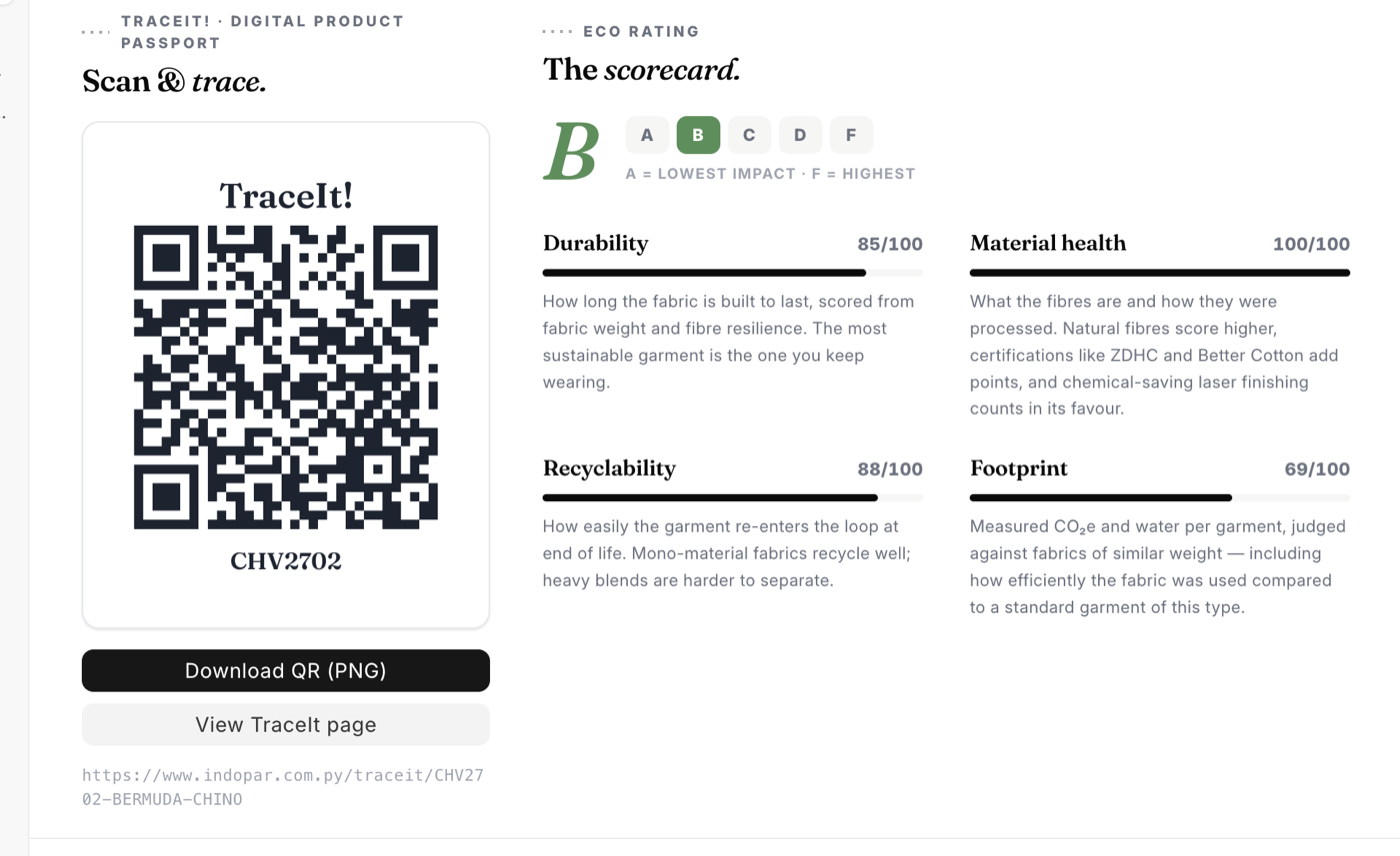
The left column is the QR code. The generated image carries the TraceIt! wordmark, the code itself, and the garment's Model Code printed underneath — so a printed sheet of them is still sortable by eye.
- Download QR (PNG) — saves the image as
<model-code>-traceit-qr.png, ready for a hangtag, a care label, or a spec sheet. - View TraceIt page — opens the live passport in a new tab. Look at it before a brand does.
The public address is printed below the buttons and follows a fixed pattern:
https://your-site.com/traceit/<tech pack>
You don't have to place the QR by hand. The label designers on the Brand — washcare, hangtag and carton — include a TraceIt QR element that generates the same code, so it lands on the artwork with everything else.
Eco Rating
The right column is the scorecard: a letter grade from A to F on a scale strip, where A is the lowest impact and F the highest. Below it, four pillars, each scored out of 100:
- Durability — how long the fabric is built to last, scored from fabric weight and fibre resilience. The most sustainable garment is the one you keep wearing.
- Material health — what the fibres are and how they were processed. Natural fibres score higher, certifications like ZDHC and Better Cotton add points, and chemical-saving laser finishing counts in its favour.
- Recyclability — how easily the garment re-enters the loop at end of life. Mono-material fabrics recycle well; heavy blends are harder to separate.
- Footprint — measured CO₂e and water per garment, judged against fabrics of similar weight — including how efficiently the fabric was used compared to a standard garment of this type.
The score is computed from the Tech Pack's linked Fabric and that fabric's Certifications. That's the whole input, and it has a practical consequence: a Tech Pack with no Fabric linked shows a grade of N/A and zeroes across the pillars. If the scorecard looks empty, the fix is on the Design tab, not here.
Using it well
- Check the grade before the brand does. It's derived from your own spec, so a surprising score usually means the Fabric record is thin — missing weight, missing composition, certifications not linked.
- Certifications are worth entering properly. They feed Material health directly, and they're the part a brand is most likely to ask you to prove.
- The passport is public. Anyone with the link can read it. Nothing about cost, supplier pricing or internal notes appears on it, but treat the link as public information.
What to do next
The scorecard is only as good as the Fabric behind it. If a style's grade looks wrong, start there — composition, weight, and certifications are what move it.