Dispatch and Recovery
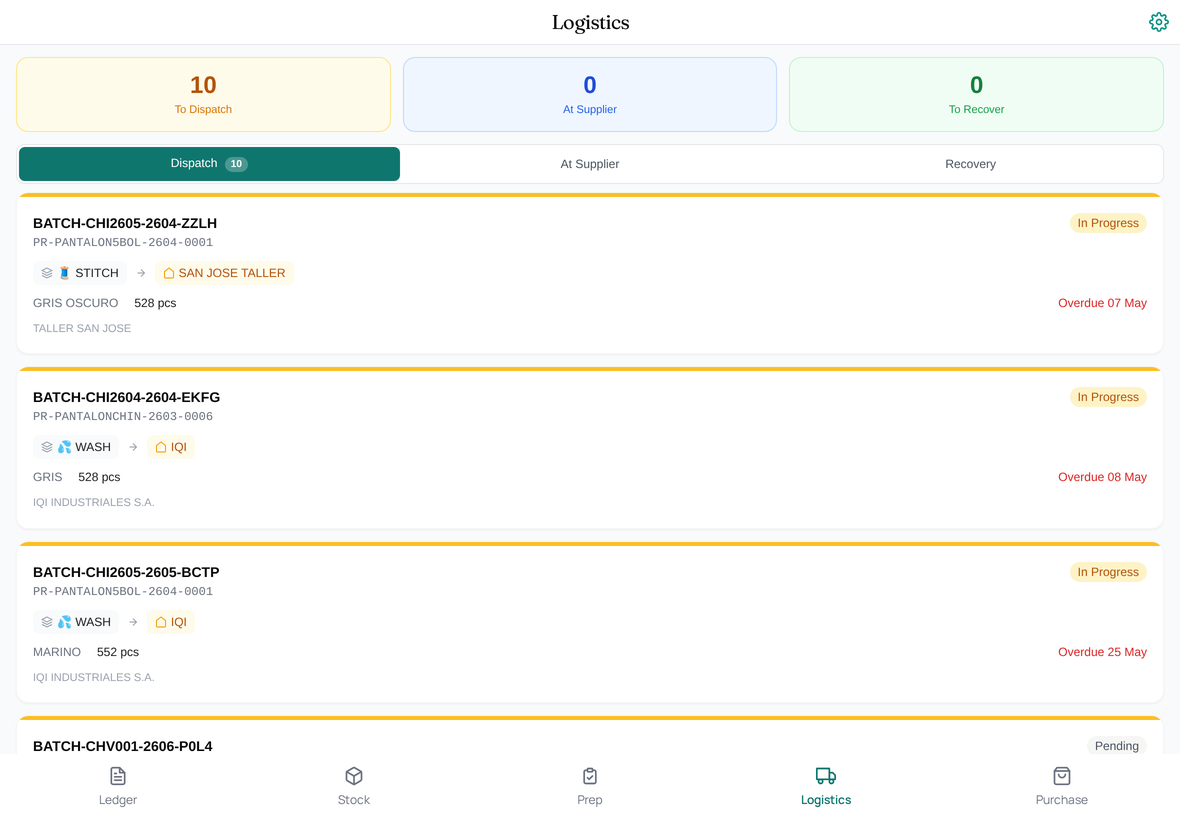
The Logistics tab in the app is the workflow view for external units. It groups everything that needs to be dispatched to a subcontract supplier today, and everything you're expecting back. It's the view a dispatcher opens at start of shift and works through it.
What the Logistics view shows
Two panels:
- Dispatch Queue — Batches with Operation Steps assigned to External Production Units, where the materials need to leave your factory. Each row: Batch, target supplier, target operation, quantity, age of the dispatch (how long it's been waiting).
- Recovery Queue — Batches with completed external operations whose output needs to come back. Each row: Batch, source supplier, source operation, expected quantity, age (how long it's been at the supplier).
Both panels read from the same underlying data the External Unit Balance report summarizes.
Working the dispatch queue
Pick a Batch from the Dispatch Queue. The detail view shows:
- The materials and/or WIP that need to leave for this external unit.
- The target unit (a Production Unit of type External), its supplier, its warehouse.
- A pre-filled OLE Handoff entry ready to post.
The dispatcher:
- Confirms the quantity going out.
- Adds any consumption (rare; most dispatches don't consume materials beyond what was already transferred to the unit).
- Captures the driver's acceptance signature if required.
- Submits. The OLE posts as a Handoff. If the unit has a default cost source (Blanket Order or PO), it's referenced on the corresponding Batch Operation Step for cost rollup.
The Batch's Operation Step for that external operation moves to In Progress. The Recovery Queue starts watching for the return.
Working the recovery queue
When goods come back from a subcontractor, the dispatcher picks the corresponding Batch from the Recovery Queue. The detail view shows:
- What was expected back (quantity dispatched minus any agreed allowances).
- The receiving operation and warehouse.
The dispatcher:
- Enters the actual quantity received.
- Records any Scrap as a separate OLE entry — units that didn't return or returned damaged.
- Captures sign-off if required.
- Submits.
The Batch's Operation Step for the external operation moves to Done. The receiving operation's Step moves to Pending (ready for the next dispatcher / production staff to pick up).
When dispatch and recovery don't match
This is the moment GarmentFlow earns its keep. Three common cases:
- Over-recovery. Subcontractor sends back more than was dispatched. Usually a counting error somewhere; reconcile on the spot and document the difference on the OLE remarks.
- Under-recovery. Subcontractor sends back fewer units. Could be lost, damaged, or held back for a re-pass. Record as Scrap (if lost/damaged) or as Reprocess (if held back for re-work). The Batch's quantity gets adjusted; the cost rollup adjusts with it.
- Delayed recovery. Goods haven't come back after the expected window. The Recovery Queue's age column flags it; the dispatcher chases the supplier.
The honest recording is what makes the dashboards trustworthy. Don't fudge a recovery quantity to make the dispatch reconcile cleanly — the Material Reconciliation dashboard will catch it later and you'll have a harder time explaining the inconsistency.
What to do next
For the cross-section view of external units and supplier interactions, see External units and suppliers.